
Plans
Freesbe has four plans. Prices and the full comparison are on the pricing page. What each plan includes and costs can change; the Billing page in your workspace settings always shows what yours includes today. If you pay for a plan, you keep your price when the list price changes, until you change plan. Every number for every plan, from people to AI requests and webhooks, is on Plan limits.
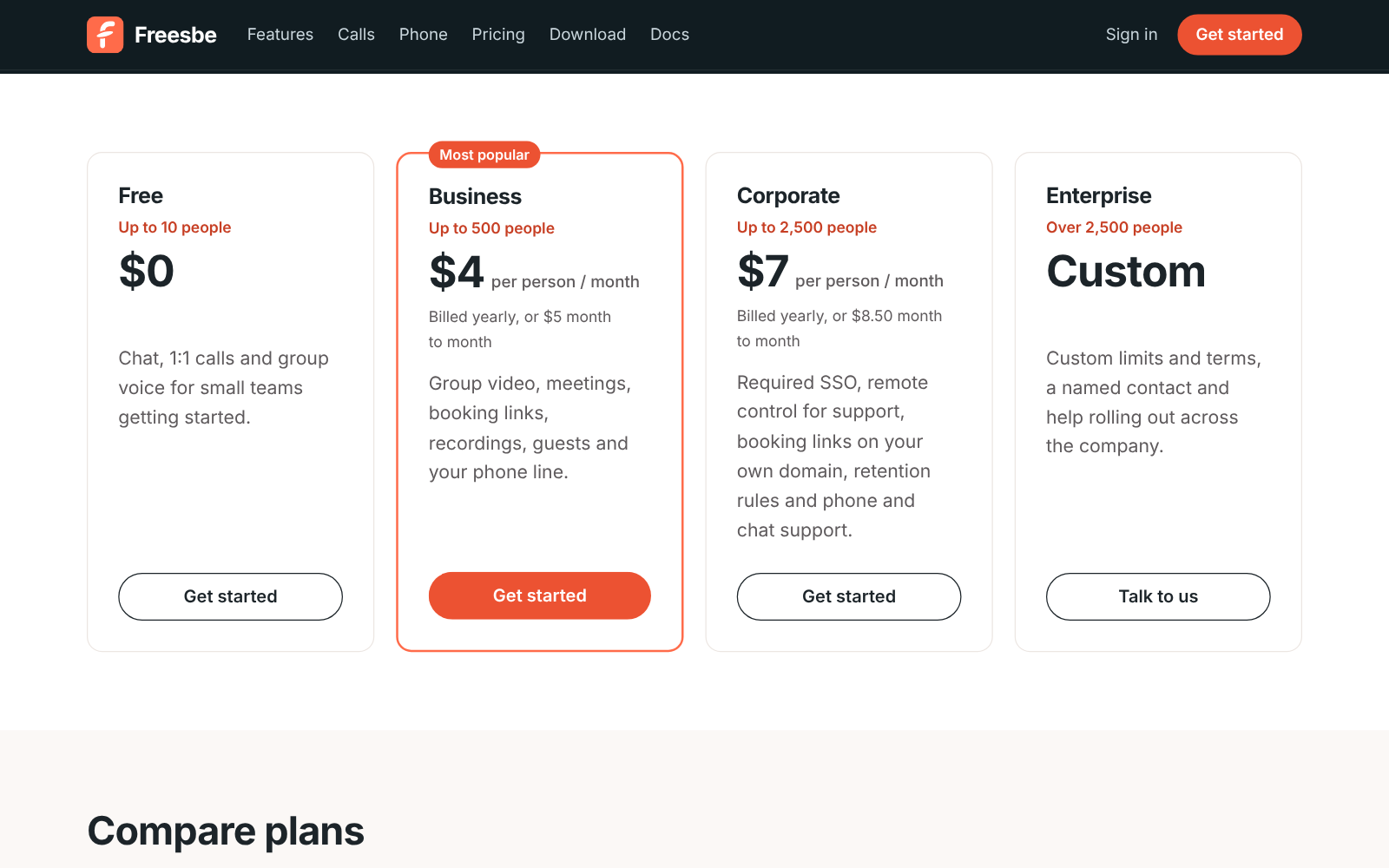
| Plan | Price | Sized for |
|---|---|---|
| Free | $0 | Up to 10 people |
| Business | $4 per person a month billed yearly, $5 month to month | Up to 500 people |
| Corporate | $7 per person a month billed yearly, $8.50 month to month | Up to 2,500 people |
| Enterprise | Custom | Over 2,500 people |
Options your plan doesn’t include
Section titled “Options your plan doesn’t include”A setting your plan doesn’t include stays greyed out, with a padlock and a line saying which plan it needs, like Requires the Corporate plan. The plan’s name is a link: owners and admins go straight to Billing → Plans to upgrade, and for Enterprise it opens an email to sales@freesbe.net. Members see the same line and are asked to check with an admin.
Free trial
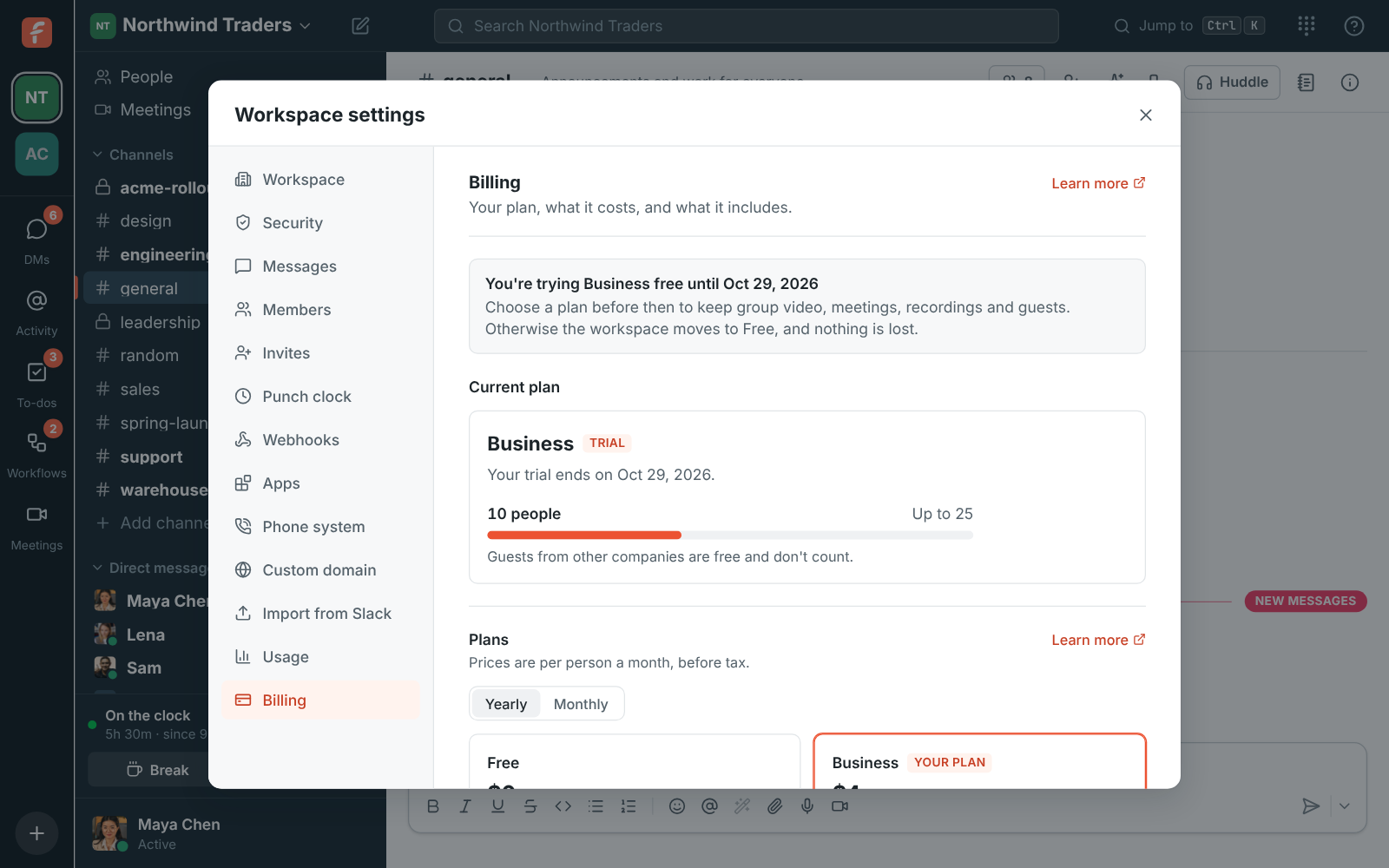
Section titled “Free trial”A workspace you create by signing up gets Business free for 14 days, with no credit card. During the trial you can use everything in Business, with a few limits so the trial stays free for everyone:
| During the trial | Up to |
|---|---|
| People in the workspace | 25 |
| Group video | About 5 hours of a 3-way call |
| Transcripts and AI notes | 1 recording |
| AI summaries, translations and writing help | 50 requests |
| Files | 5 GB |
Each person, email address and company gets one trial, so a second workspace you create starts on Free. Admins see how many days are left under Workspace settings → Billing, and a reminder at the top of the app in the last five days. Owners and admins also get an email three days before the trial ends, and another when it has ended.
When the trial ends, the workspace moves to Free unless you choose a plan. Nothing is deleted: messages, files and recordings stay, and Business features come back as soon as you upgrade. If you choose a plan during the trial, the rest of the trial stays free: your card is first charged on the day the trial would have ended.
Channels, DMs, threads, search, 1:1 voice and video calls and group voice huddles, with 90 days of history, 5 GB of files and one incoming webhook. Also 30 AI summaries, translations and writing help a month for the workspace. Recording, scheduled meetings and guests need a paid plan.
Business
Section titled “Business”Everything in Free, plus:
- Unlimited history and 10 GB of files per person.
- Group video and screen sharing, with 20 video hours per person a month pooled across the workspace.
- Meetings with guest links, booking links and calendar free/busy, and call recordings with transcripts and AI notes (10 hours of transcripts per person a month).
- AI summaries, translations and writing help: 100 requests per person a month, pooled.
- Guests from other companies.
- Requiring multi-factor authentication.
- The phone line and dialpad and the punch clock.
- Outgoing webhooks, the REST API and Slack import.
- WhatsApp in the customer inbox, with photos, files and templates. Meta bills WhatsApp’s own fees to your WhatsApp Business account.
- Your own profile fields, like Region or Start date, and fields only admins fill in. Every plan has the built-in ones: pronouns, department, location, manager and phone.
- Email support.
Corporate
Section titled “Corporate”Everything in Business, plus:
- Up to 2,500 people, 20 GB of files per person and 40 video hours per person a month.
- 300 AI summaries, translations and writing help per person a month, pooled.
- Requiring single sign-on for everyone.
- File type rules that share only the kinds of file you pick, with always-allow and always-block lists.
- Booking links on your own domain, like
meetme.acme.com/dana(coming soon). - Rules that delete recordings after 30, 90 or 365 days.
- The Salesforce app: opportunity, lead and case alerts, link previews,
/salesforceand Log to Salesforce. - Phone and chat support in business hours, and help moving from Slack.
- Paying by invoice or purchase order.
Enterprise
Section titled “Enterprise”Everything in Corporate, with custom people, storage and video limits, a named contact with priority response, your own contract and security review, and directory sync (SCIM) once it ships. Email sales@freesbe.net to talk about Corporate or Enterprise.
AI on every plan
Section titled “AI on every plan”Every plan comes with AI summaries, translations and writing help, transcripts and AI notes from huddles and meetings, and AI agents like Claude and ChatGPT. The plans differ in how much each month:
| Plan | AI requests a month | Transcripts and AI notes |
|---|---|---|
| Free | 30 for the workspace | 3 a month |
| Business | 100 per person, pooled | 10 hours per person a month |
| Corporate | 300 per person, pooled | No set limit |
| Enterprise | No set limit | No set limit |
Add-ons
Section titled “Add-ons”The phone system is bought on top of any paid plan: $8 per person a month billed yearly, or $10 month to month. It includes one local number and 1,000 minutes and 200 texts per person a month. More local numbers, and toll-free numbers, are $5 a month each. Buying a number needs the Phone system add-on and a one-time identity check.
Adding seats or add-ons is prorated: you pay now for the rest of the period. Removing takes effect at the end of the period, with no refund. See Billing.
Who counts as a person
Section titled “Who counts as a person”Everyone with an active account in the workspace. Guests from other companies and people who join a meeting through a guest link are free. When a workspace grows past its plan’s size, nothing stops working; we’ll get in touch about moving to the next plan.
Answers come from the Freesbe guides and are written by AI, so check the linked guide before relying on one. Please don't include personal details such as emails or passwords.